Customize the terminal
The task command center is yours to arrange. Choose which columns appear and in what order (includingmodel, stage and effort), set each width in cells or let it grow withauto, and place the flowchart on any side. Save the result as .maestrun/layout.json for one project or ~/.maestrun/layout.json for all of them, then reopen the view.
Maestrun · task command center All 3 Working 2 Done 0 Waiting 1 Issues 0 ────────────────────────────────────────────────────────────────────────────────────────────────────────────────────────~/demo/.maestrun/samples/run-01XNLZ 0/3 tasks · 3/12 steps · 25% · 0:58 Task Name Status Model Effort Steps │ [ Flow ] PgUp/PgDn sample-add Add two numbers independ… Working gpt-6.1-sol – 3/4 │ sample-clamp · Clamp a value and …› sample-clamp Clamp a value and demons… Working gpt-6.1-sol medium 0/4 │ sample-compose Use both integrated resu… Waiting gpt-6.1-sol – 0/4 │ ┌────────────────────────────────┐ │ │Implementation │ │ │In progress │ │ │gpt-6.1-sol · medium │ │ │in: 51005 · out: 556 │ │ └────────────────────────────────┘ │ ↓ │ ┌────────────────────────────────┐ │ │Tests │ │ │Waiting │ │ │gpt-6.1-sol · low │ │ │in: n/a · out: n/a │ │ └────────────────────────────────┘ │ ↓ │ ┌────────────────────────────────┐ │ │QA │ │ │Refactor · needs changes │ │ │gpt-6.1-sol · high │ │ ↓ 2 later steps ────────────────────────────────────────────────────────────────────────────────────────────────────────────────────────Implementation · codex / gpt-6.1-sol · Effort: medium PgUp/PgDn steps · ↑/↓ tasks · Tab filter · F flow · I instructions · Enter details · Ctrl+C options
{
  "columns": [
    { "id": "task", "width": 14 },
    { "id": "name", "width": "auto" },
    { "id": "status", "width": 10 },
    { "id": "model", "width": 13 },
    { "id": "effort", "width": 8 },
    { "id": "steps", "width": 6 }
  ],
  "flowchart": { "visible": true, "position": "right", "width": 34, "height": "auto" }
}
Project columns replace global columns; flowchart fields merge. Invalid layout files produce an error without being rewritten, and plain logs ignore layout settings. Details are in Terminal and layout.
Workflow and configuration
maestrun init --advanced opens the full editor: stages, per-stage executor/model/effort, frontend/backend assignments, and sequential or parallel execution. Esc goes back; Ctrl+C cancels.
Planning is always first. Custom stages use custom:<name> and optional .maestrun/steps/<name>.md instructions. Existing QA/Review stages remain supported; add them to new workflows through global presets.
config.json → stages lists model-executed stages. Integration is an automatic Git operation for worktree tasks, so it does not belong in stages and has no executor, model or effort setting. It integrates task changes into the main project after the configured stages pass; the task is complete only after integration succeeds. The flowchart shows both configured task stages and this automatic operation.
Use exact model IDs. Manual entry is available if discovery fails; Claude aliases and Copilot auto are not accepted. Model discovery does not guarantee account access. Unset effort uses the executor’s default; Grok may ignore unsupported effort settings.
Edit settings
maestrun config                            # effective project settings
maestrun config execution parallel
maestrun config concurrency 4
maestrun config execution.maxRepairs 5
maestrun config stages planning model your-model-id
maestrun config stages planning effort high
maestrun config timeoutMs 600000
maestrun config global background true     # default for other projects
maestrun config stages.planning.effort null # remove an optional override
Changes save immediately. Paths accept spaces or dots, stage IDs or zero-based indexes. Use spaced paths for IDs containing dots: stages 'custom:Audit.v2' effort high. JSON can replace entire sections. Invalid changes preserve the file.
| Setting | Default / constraint |
|---|---|
execution.mode |
sequential or parallel |
execution.concurrency |
1–16; defaults to 2 when omitted; sequential runs one task |
execution.maxRepairs |
5 repair cycles per task per run; integer 0–100; 0 disables repairs |
execution.background |
false |
timeoutMs |
600000; range 1000–86400000, per executor invocation |
Stage effort |
Executor default when unset |
targets |
Optional; requires both frontend and backend assignments |
plugins |
Empty; project-relative ./…mjs or ./…js modules |
Frontend/backend overrides affect only Implementation for tasks with that target. Other stages keep their assignments.
Global defaults and presets
Global settings live in ~/.maestrun/config.json; project settings live in .maestrun/config.json. Project values win. Execution fields merge individually; stages, targets, and plugin arrays replace the global section. Paths remain relative to the project using them.
Execution, timeout, plugins, and presets can be configured globally before setup. Editing an unset global stage/target section copies it from the current project, or you can supply the whole section as JSON. Projects may inherit global stages without a local workflow.
maestrun config global stepPresets '["QA", "Review", {"name":"Security audit","effort":"high"}]'
maestrun config global stepPresets 'Security audit' model your-model-id
Presets appear unchecked in the full workflow picker. Names are unique ignoring case. Saved project assignments win; a shared assignment overrides presets for the selected steps. Preset changes affect future setup, not existing workflows. Use null to remove optional fields or the list.
Configuration example
Replace the model placeholders with IDs available to your account:
{
  "version": 1,
  "stages": [
    { "id": "planning", "executor": "codex", "model": "your-model" },
    { "id": "implementation", "executor": "codex", "model": "your-model" },
    { "id": "testing", "executor": "claude", "model": "your-claude-model" }
  ],
  "execution": { "mode": "parallel", "concurrency": 2, "background": false },
  "timeoutMs": 600000,
  "plugins": []
}
Templates
Reuse a workflow locally:
maestrun template save team
cd /path/to/another/project
maestrun init --template
Transfer it to another machine:
maestrun template export team.json
# Copy team.json to the destination machine.
maestrun template import team.json team
maestrun init --template
maestrun doctor- Packages contain configuration, referenced step instructions, and extension requirements.
- Missing files are listed. Identical instructions are preserved; conflicting files stop initialization.
- Plugin code and dependencies must be copied separately. Import never authorizes execution.
- Save/import and project replacement require confirmation. Legacy configuration-only templates still work.
Templates live in ~/.maestrun/templates/<name>.json. Names use 1–64 letters, digits, hyphens, or underscores, starting with a letter or digit.
Planning and task format
Create a plan separately
maestrun init
maestrun plan                 # collect requirements and generate
maestrun plan --interactive   # also allow model clarification questions
maestrun run --dry-run
Both planning modes require a terminal and run environment checks first. Existing planning documents appear in the requirements selector; you can also enter another path. Choose Simple for one plan or Advanced for prd.md, techspec.md, and tasks.md in a new folder. Root plan.md links to the generated tasks.
Planning includes project guidance automatically: skills under .agents, .codex, .claude, and .github; rules under their rule/instruction folders; root AGENTS.md, CLAUDE.md, and .github/copilot-instructions.md. The preview lists loaded files. Replacing a plan requires confirmation; failed or cancelled generation preserves the previous plan.
Planning restricts tools to reading. These restrictions are not a universal OS sandbox; executor policies still apply. Interactive Codex uses one planning session, with its timeout including answer time. Claude, Copilot, and Grok apply the timeout per request.
Write tasks
Use this format in plan.md or pass another file with --tasks:
## Tasks

### Task api: Implement the API

- Depends on: none
- Target: backend

Implement the endpoint described in the specification.

#### Acceptance criteria

- [ ] Reject invalid input.
- [ ] Cover valid requests with tests.

#### Verification

Run the API tests and record the results.

### Task ui: Connect the UI

- Depends on: api
- Target: frontend

Connect the UI and test loading, success, and error states.
IDs must be unique letters, digits, underscores, or hyphens. Dependencies are none or comma-separated IDs. Target is optional. Each task needs nonempty instructions; use level-4 headings inside it. Missing dependencies and cycles fail validation. Checkboxes do not determine completion: saved progress does.
For one file per task, make tasks.md a checklist of Markdown links. Each linked file starts with # Task <id>: <title>, followed by the same metadata and instructions. Paths are relative to the index; wrap paths containing spaces in <...>. Checked links are still loaded.
maestrun run --tasks tasks/tasks.md --dry-run
maestrun run --tasks tasks/tasks.md
Legacy JSON task files and fenced maestrun-tasks blocks remain supported. Do not mix JSON blocks and Markdown tasks in one document.
Execution and recovery
Run, detach, reconnect
| Command | Behavior |
|---|---|
maestrun start |
Check environment; reuse or create workflow/plan; preview; ask to run |
maestrun run |
Start/resume tasks, or reconnect to an active worker |
maestrun run --dry-run |
Validate tasks and checkpoints without model calls, plugin imports, or report writes |
maestrun run --background |
Start a background worker |
maestrun run --no-background |
Override the saved background preference for this run |
maestrun |
Reconnect to an active or saved background session |
maestrun run --status |
Print the saved report as JSON |
start also accepts --tasks, background options, and --trust-plugins. An invalid existing plan stops the command instead of being regenerated. run and --status work without a terminal.
Every task runs the configured stages after Planning. Completed tasks and steps are skipped. Parallel execution uses bounded batches with a separate Git worktree for each task. Dependent tasks start only after their prerequisites are integrated.
Model-reported failure/refactor gets up to 5 automatic repair cycles per task per run, restarting at Implementation when possible. Set execution.maxRepairs to change the limit; 0 disables repairs. Exhausting the limit blocks dependants; independent tasks can continue. Executor errors, invalid output, timeouts, and cancellation stop that task immediately. Repair evidence is retained in the report.
Executors can edit the workspace and run checks; prompts prohibit commits, pushes, and deployment. Success is the executor’s reported result. Local server checks should start the server and test it in the same shell command, especially under Linux/WSL sandboxing.
Parallel worktrees
Parallel mode requires Git 2.38+, an initial commit, and execution from the repository root. Unresolved merges and submodules must use sequential mode. doctor and dry-run check these prerequisites.
- Each task gets a snapshot of tracked and nonignored files, including uncommitted changes. Runtime state is excluded; configuration and step instructions are copied separately.
- Worktrees live under
~/.maestrun/worktrees/<project-id>/. Ignored dependencies and environment files are not copied; install dependencies inside each worktree. - After the task’s stages pass, a three-way Git merge integrates its changes. The main branch and staging index are preserved; snapshots create internal Git objects, not branch commits.
- Conflicts leave the main project untouched by that integration. The original output is retained, and a separate resolution worktree contains conflict markers. Resolve and test there, run
git addfor resolved files, then repeat the original Maestrun command from the main project. Completed stages are not rerun during integration-only recovery. - Failed/cancelled worktrees are kept for resume. Successful integration removes the task’s worktrees. Keep
.maestrun/run.jsonand retained worktrees together until recovery finishes.
Worktrees isolate files, not network ports, databases, or plugin process memory. Use task-specific resources or explicit dependencies. Extensions must use the supplied cwd. Older partial checkpoints without worktrees should finish in sequential mode before enabling parallel execution.
Recover from a failure
Interactive failures offer View evidence, Adjust configuration, Resume, and Exit and keep progress. Resume validates the same task document and keeps the current invocation’s plugin authorization. Noninteractive failures print next steps and exit.
| Problem | Next step |
|---|---|
| Installation or authentication | Run maestrun doctor; follow the executor’s login/update instructions |
| Unavailable model | Choose an accessible exact ID with maestrun init --advanced |
| Invalid plan | Fix the task document, then run maestrun run --dry-run |
| Failed task | Inspect maestrun run --status, fix the cause, and repeat the same run command |
| Timeout | Check connectivity/account limits or increase timeoutMs |
| Missing template file | Copy it into the project or remove its stage/plugin reference |
| Stale lock after a crash | Confirm the worker and executors stopped before removing stale session.json, session.lock, or run.lock |
Preserve .maestrun/run.json. Changed task definitions or incompatible stage sequences stop resume; use new task IDs for different work. Interrupted steps may run again, so inspect partial changes first. Tasks removed from the current plan retain their progress in archivedTasks.
Doctor checks Node/platform, executor compatibility/authentication, config/layout, referenced files, and locks without generation or plugin execution. Missing unused executors are warnings; unusable configured executors and execution locks are errors. It never deletes locks. Exit codes: 0 success/detachment, 1 failure, 130 cancellation.
Terminal and layout
| Key | Action |
|---|---|
| ↑ / ↓ | Select task or scroll details |
| Tab / Shift+Tab, ← / → | Change status filter |
| Enter | Toggle task details |
| F | Toggle flowchart |
| PgUp / PgDn, Home / End | Browse steps or jump to first/last |
| I | Send instructions to a running model task |
| Esc | Leave details/input; close a finished run |
| Ctrl+C | Choose background execution or cancellation; plain output cancels |
Codex steers the active turn; Claude, Copilot, and Grok queue follow-ups in the same session. Delivery notices and conversations persist across reconnection. Extension steps have no model conversation.
The flowchart labels completed, running, failed, and refactor states. Token counts are input/output for execution only: n/a means unavailable, and */partial means incomplete data. Counts include repairs and resumes without estimating missing usage.
Set global layout in ~/.maestrun/layout.json or project overrides in .maestrun/layout.json:
{
  "columns": [
    { "id": "task", "width": 10 },
    { "id": "name", "width": "auto" },
    { "id": "status", "width": 14 },
    { "id": "tokens", "width": 16 }
  ],
  "flowchart": { "visible": true, "position": "right", "width": 40, "height": "auto" }
}
Column IDs: task, name, status, stage, model, effort, steps, tokens. Order controls display order; omitted columns are hidden. Use unique IDs and positive widths or "auto".
The flowchart includes every configured task stage and, for worktree tasks, a final Integration step labeled Git · local. This automatic operation is not an entry in config.json → stages and makes no model calls. It shows waiting, running, completed, failed or cancelled integration; PgUp/PgDn and Home/End reach every step on smaller terminals.
Flowchart positions: left, right, top, bottom. Width is at least 20 cells; height at least 9, or "auto". Side placement needs 97 columns; top/bottom needs 22 rows. Smaller terminals show the chart alone during step browsing.
Project columns replace global columns; flowchart fields merge. Reopen the view after edits. Invalid layout files produce an error without rewriting them; plain logs ignore layout settings.
Extensions and host plugins
Runtime extensions
Register a reviewed project-local module and authorize it for each run:
maestrun config plugins '["./integrations/audit.mjs"]'
maestrun run --trust-plugins
Extensions have full process permissions. The flag is never saved or granted by imported configuration; status and dry-run never load extensions. Reconnecting keeps the already-authorized worker.
export default {
  apiVersion: 1,
  name: "audit",
  stages: {
    "custom:Audit": async ({ task, signal }) => {
      signal.throwIfAborted();
      // Perform verification here; throw on failure.
      return `Audit completed for ${task.id}`;
    },
  },
};
Optional beforeStep and afterStep hooks run in configuration order. Hooks/handlers receive { cwd, task, stage, signal, timeoutMs }; afterStep also gets result. Custom handlers replace that stage’s model call and must return a nonempty summary. Built-in stages cannot be replaced; duplicate names/handlers fail validation. Extensions manage their own cancellation, timeouts, and resources, and may be called concurrently.
Codex and Claude host plugins
Export the bundle into a new directory, then register it with your host:
maestrun plugin ./maestrun-plugin
claude --plugin-dir ./maestrun-plugin/maestrun
# Or:
codex plugin marketplace add ./maestrun-plugin
codex plugin add maestrun@maestrun-local
In Claude, invoke /maestrun:maestrun; in Codex, invoke the installed Maestrun skill. The host needs a terminal tool and maestrun on PATH. Export only creates files; it does not change global host settings. See the bundled skill.
Files and version control
| Path | Purpose |
|---|---|
.maestrun/config.json, .maestrun/layout.json |
Project workflow and UI settings |
.maestrun/steps/*.md |
Custom step instructions |
plan.md |
Tasks or links to planning documents |
<planning-folder>/{prd,techspec,tasks}.md |
Advanced planning output |
.maestrun/run.json |
Completion checkpoints, errors, repair history, token usage |
.maestrun/run.log |
Worker diagnostics; replaced on a new run |
.maestrun/session.json, session.lock, run.lock |
Worker state and execution locks |
.maestrun/background, .maestrun/cancel |
Session control markers |
~/.maestrun/worktrees/<project-id>/ |
Isolated tasks and retained conflict recovery files |
.maestrun/samples/run-* |
Independent sample projects |
~/.maestrun/config.json, layout.json, templates/ |
Global defaults and reusable workflows |
~/.maestrun/conversations/<project-id>/ |
Conversations grouped by absolute project path |
Maestrun creates .maestrun/.gitignore when absent. It allows only configuration, layout, step instructions, and the ignore file; other state is ignored by default. Existing ignore rules are preserved. Already-tracked files stay tracked, and secrets must not be placed in allowed files. Older project-local conversations remain readable.
Sample
maestrun sample                     # Simple
maestrun sample advanced            # Advanced
maestrun sample advanced --background| Sample | Tasks | Scenarios |
|---|---|---|
| Simple | Greeting → blank-name validation | Sequential implementation/tests, dependency and regression cases |
| Advanced | Add + clamp → compose results | Parallel worktrees, automatic QA repair and dependent task integration |
Tasks touch one function and its tests, using only Node.js built-ins. No installs or servers. Simple needs four model stages; advanced normally needs fifteen, including one intentional QA repair. QA deliberately requests a repair to the clamp implementation; the workflow returns to Implementation, repeats Tests and QA, then integrates both independent tasks and runs the dependent task. Actual duration depends on the executor/model.
The advanced sample is expected to complete all three tasks in one run without manual recovery.
Each invocation creates a fresh .maestrun/samples/run-* directory and prints its path. Advanced requires Git 2.38+ and automatically creates a separate repository there. In a terminal, choose executor/model/effort; otherwise saved assignments are required. Both use a five-cycle repair limit and exclude plugins, custom steps and target overrides.
To reconnect or resume, enter the printed directory and run maestrun. The main project’s configuration, Git history and progress stay unchanged. maestrun sample run remains available for the original sequential QA demonstration.
Sample screenshots
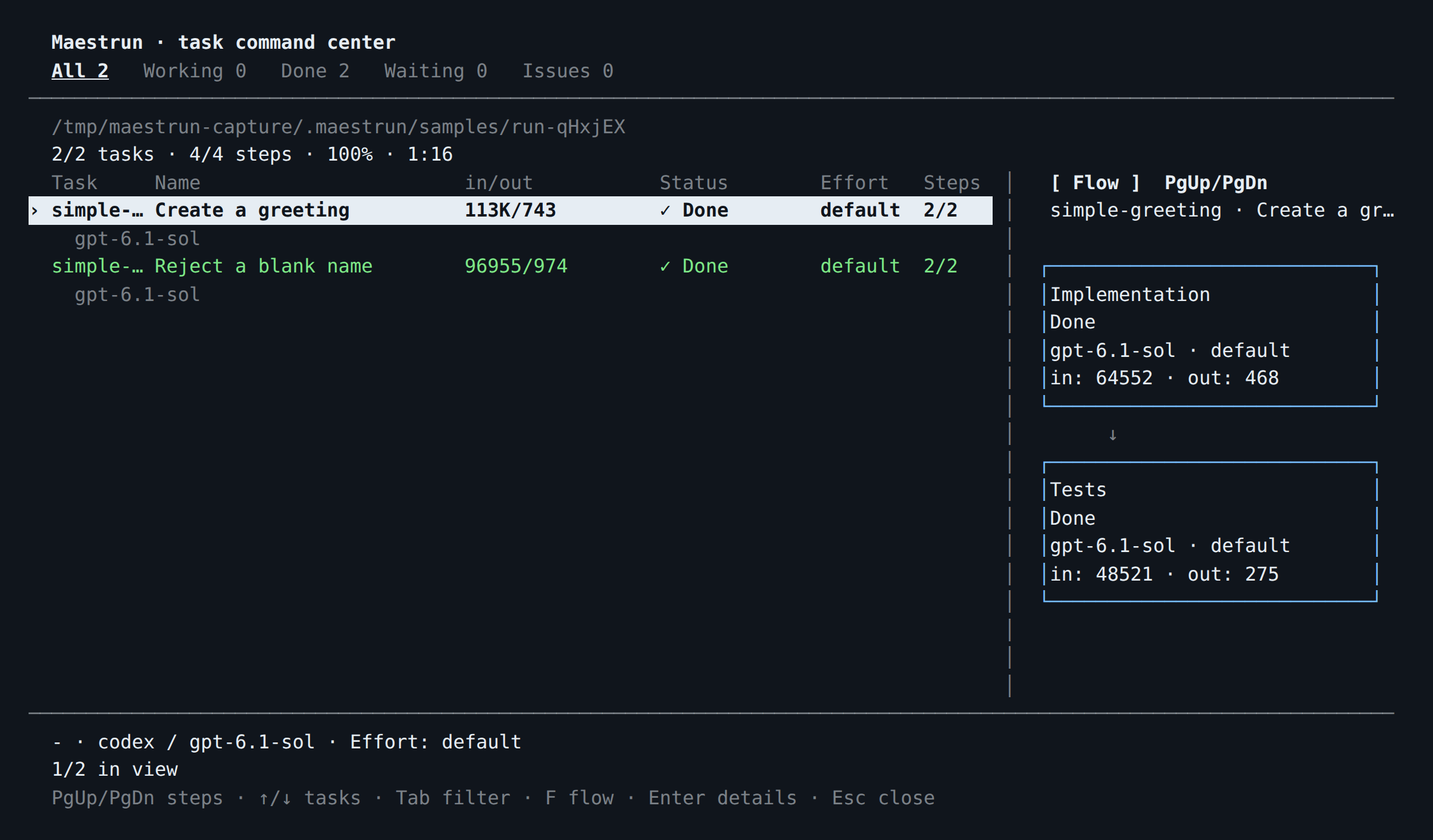
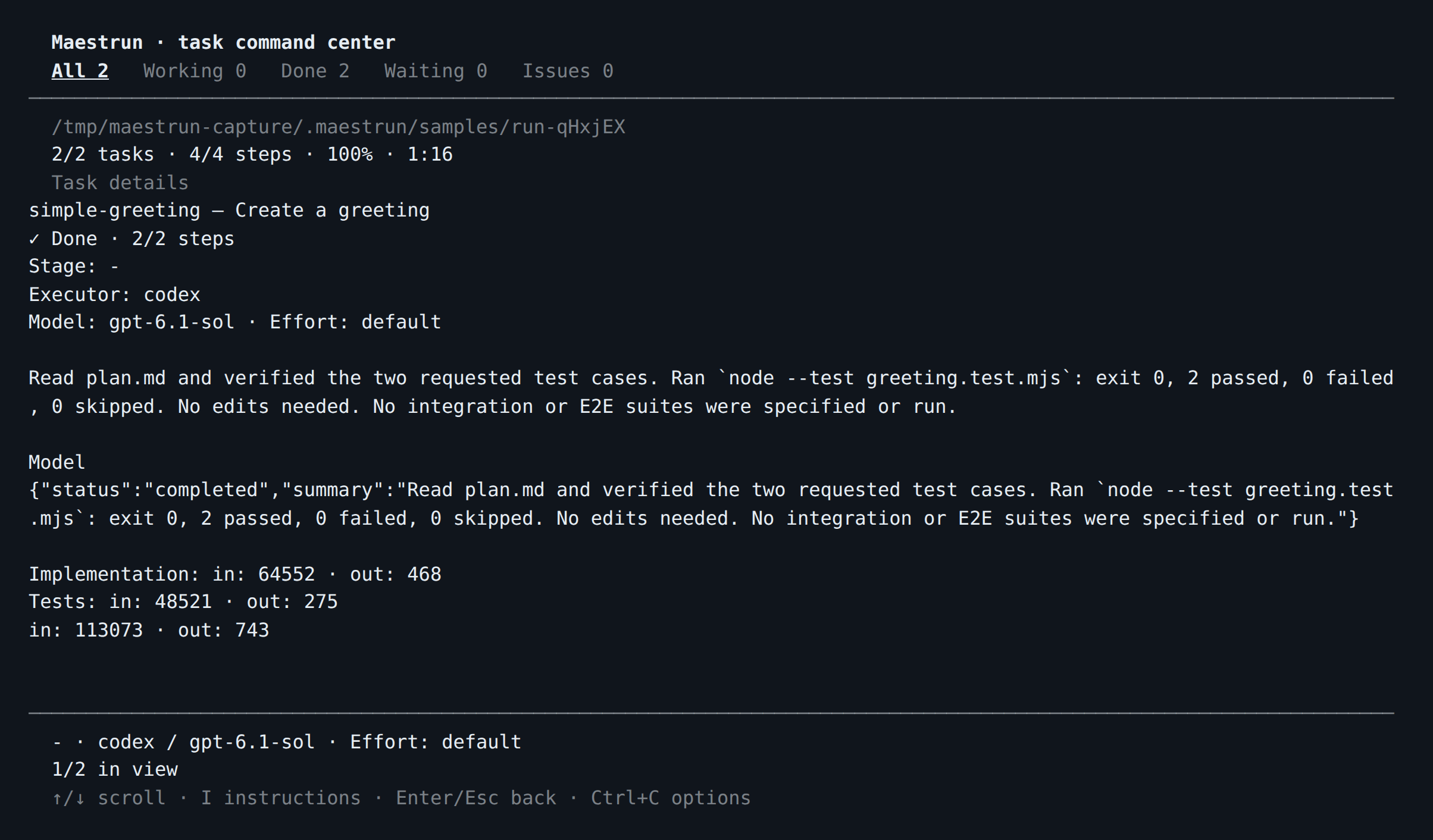
These captures show a real maestrun sample run using Codex. Timing, token usage, and model output vary between runs.
Both tasks completed, including their Implementation and Tests stages:
Press Enter on a task to inspect its result and stage token usage:
Advanced sample screenshots
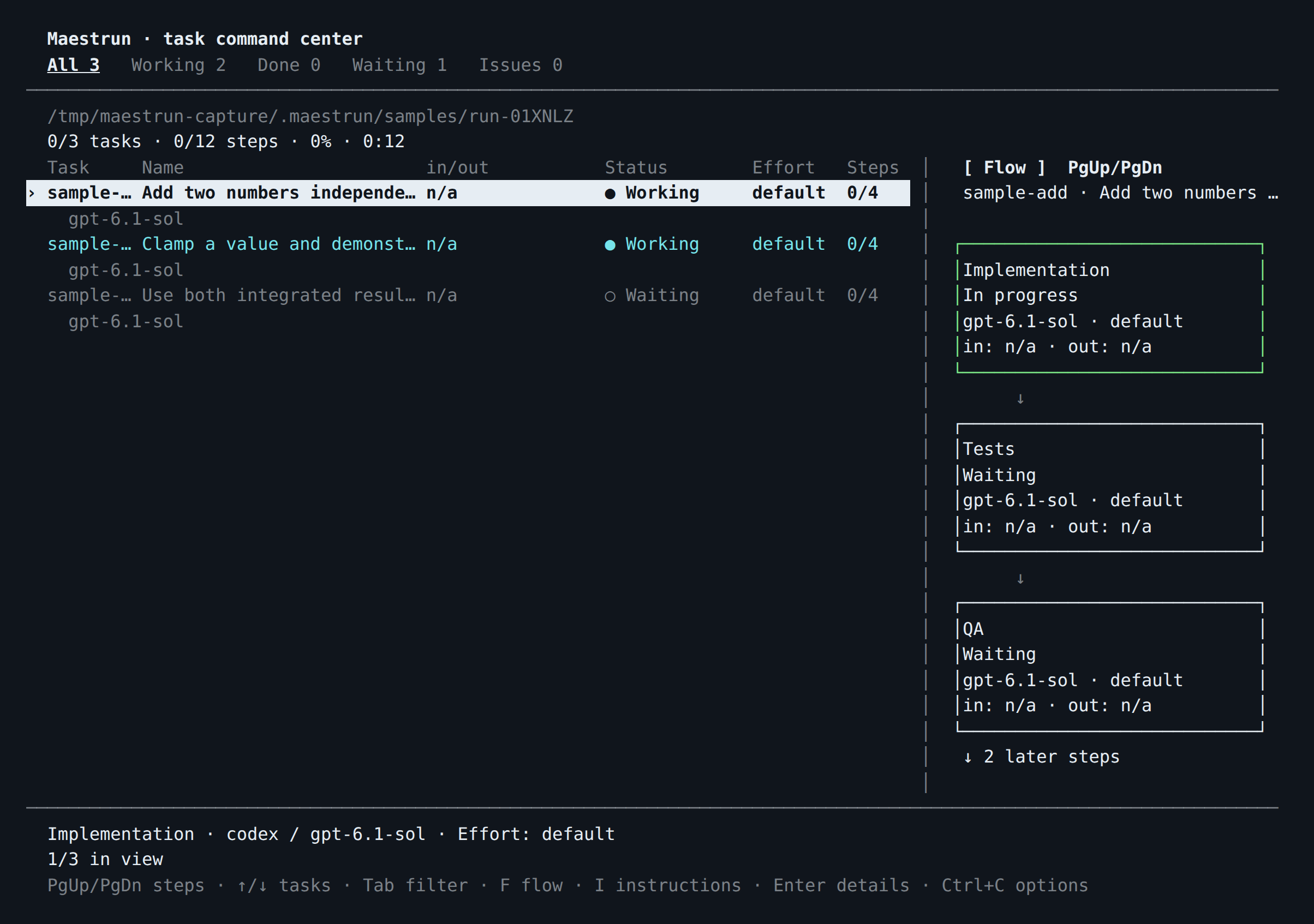
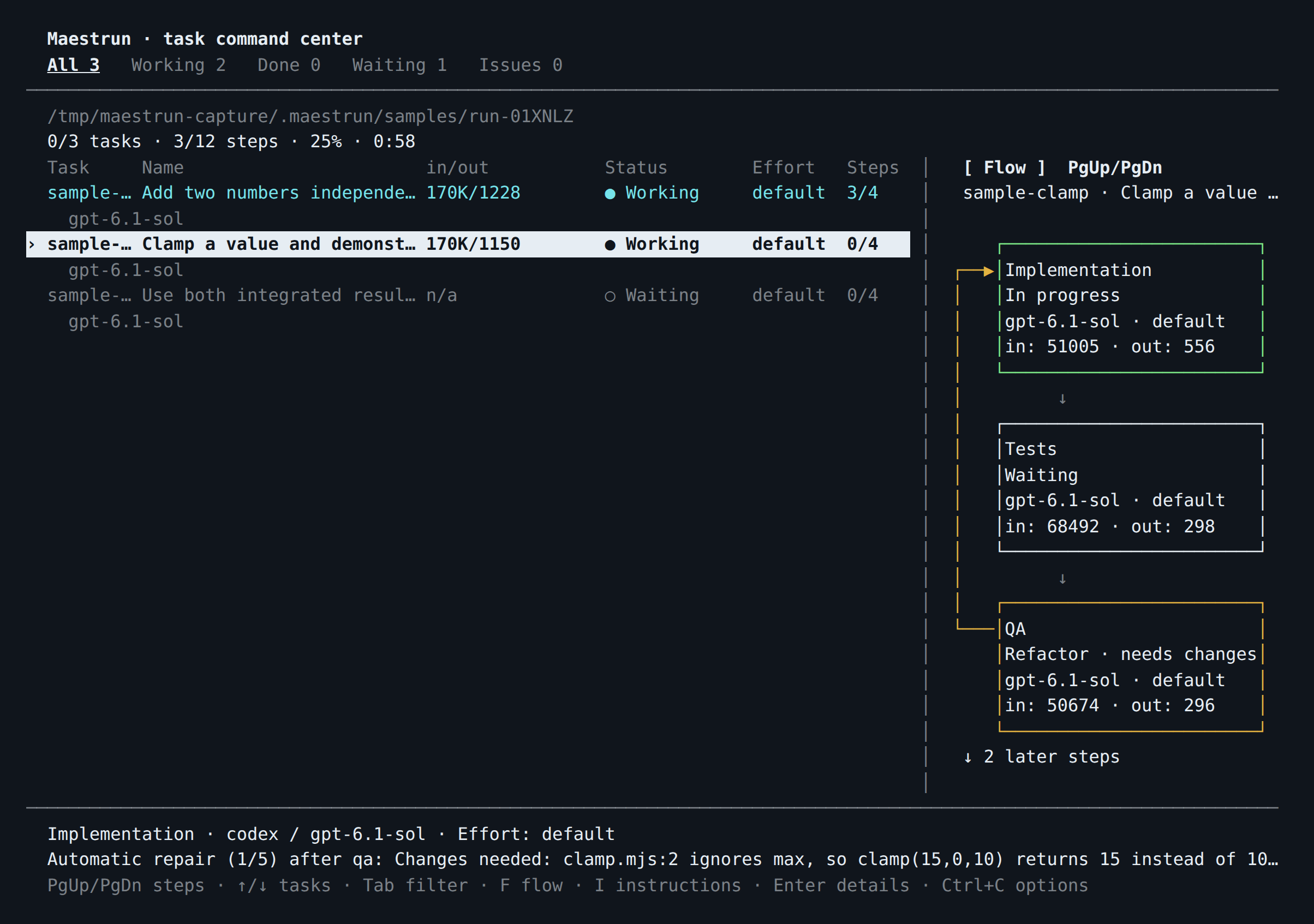
Run maestrun sample advanced to see parallel tasks, automatic QA repair, and integration. These captures use Codex; timing, token usage, and model output vary between runs.
The add and clamp tasks start in parallel, while the composition task waits for both results:
QA detects the deliberately missing upper bound in clamp. The yellow return arrow shows QA → Implementation: QA is marked Refactor · needs changes, Implementation is In progress, and Tests waits to run again. The footer shows Automatic repair (1/5) and the reason for the rework.
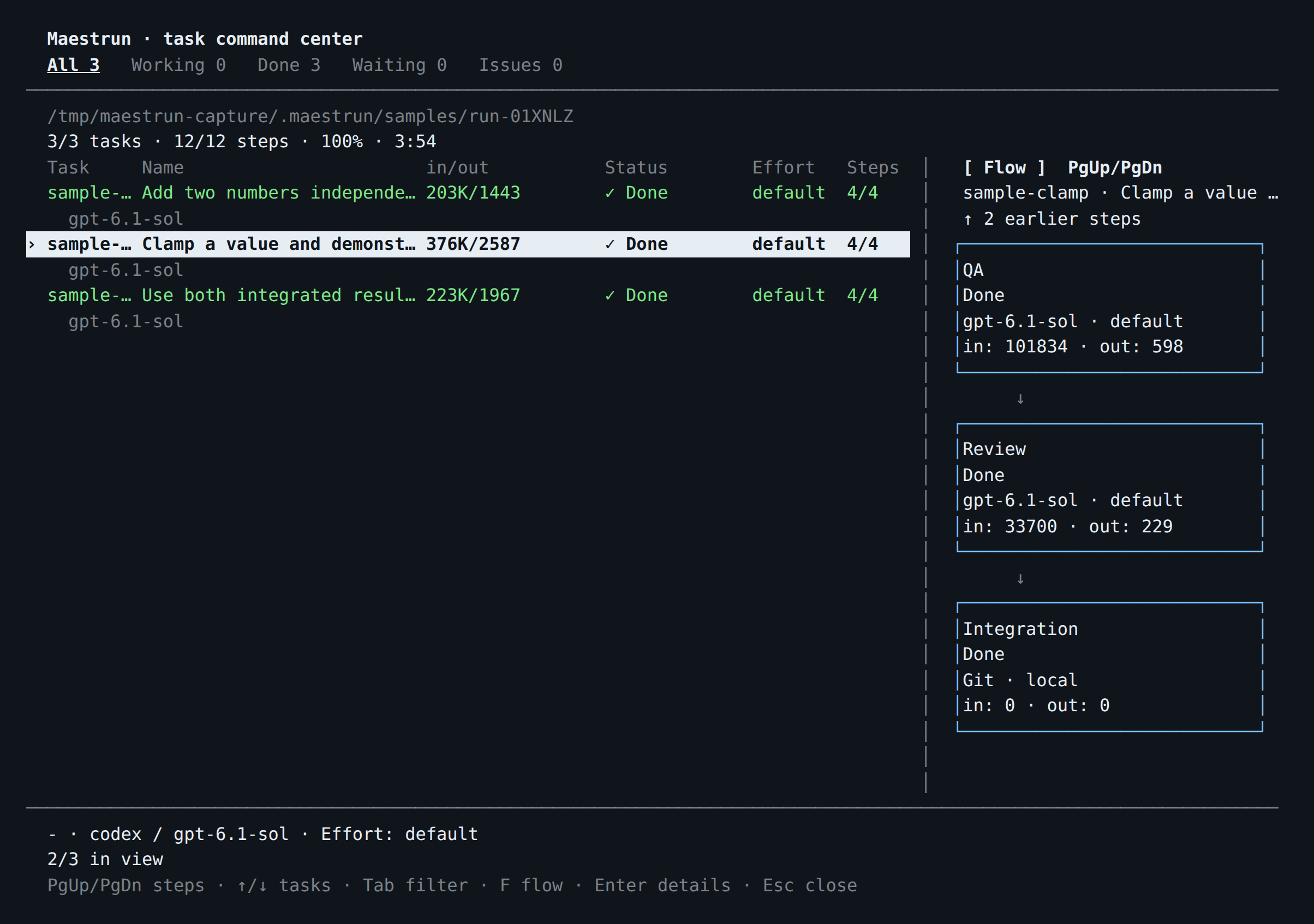
After the correction, Tests and QA run again, followed by Review and Integration. The composition task then consumes both integrated results. This run completed all three tasks after one automatic repair:
Development and releases
Clone this repository using its clone URL, or extract its source archive:
git clone https://github.com/maestrun/maestrun.git maestrun-cli
cd maestrun-cli
npm ci
npm run build
npm install --global .| Command | Purpose |
|---|---|
npm run check |
Formatting, lint, and TypeScript |
npm test |
Unit and integration tests with fake executors |
npm run test:coverage |
Coverage; minimum 80% for lines, statements, functions, branches |
npm run release:pack |
Checks, tests, build, and compiled .tgz package |
npm publish ./maestrun-maestrun-0.1.1-beta.2.tgz --access public --tag beta |
Publish a reviewed Beta package using the owner’s npm account |
Packaging locally does not publish. Users can install this release with npm install --global @maestrun/maestrun@0.1.1-beta.2 and update to the newest Beta with npm install --global @maestrun/maestrun@beta. Installation checks Node support and Windows/WSL; startup creates the home directory if install scripts were skipped.
Automatic npm publishing
Publishing a GitHub release triggers Publish to npm. The workflow checks that the release tag matches package.json and the lockfile, runs formatting, lint, type checks and coverage, then builds and publishes the package. Pre-releases use the npm beta tag; stable releases use latest. A push or a draft release does not publish anything.
One-time setup: configure an npm trusted publisher for @maestrun/maestrun, using GitHub owner maestrun, repository maestrun, and workflow filename publish.yml. Leave the environment field empty and allow npm publish. GitHub Actions authenticates through OIDC; no NPM_TOKEN secret is required.
To publish the next Beta:
- Run
npm version prerelease --preid=beta --no-git-tag-version. This updatespackage.jsonandpackage-lock.json; the CLI reads its version from the package. - Commit and push the changes, including any documentation updates.
- Publish a GitHub release targeting that commit, with tag
vfollowed by the package version, and check Set as a pre-release. - Check the Publish to npm run in GitHub Actions. After success, install with
npm install --global @maestrun/maestrun@beta.
For a stable release, use a stable package version and leave Set as a pre-release unchecked. The default install uses latest, so it will not receive Beta releases. npm versions are immutable: README or screenshot updates need a new package version too. If a workflow fails before publishing, fix the cause and rerun it; do not try to overwrite an already published version.
Source is grouped into config, contracts, shared, and flat capabilities under src/modules (workflow, planning, execution, executors, plugins, onboarding). Each capability exports through index.ts; external consumers use the barrel. Shared layers do not depend on capabilities. Architecture tests enforce these boundaries. Builds clear dist and exclude tests.
The onboarding target is a ready workflow within five minutes with the environment prepared; it is not yet a measured guarantee. start reports setup time, planning reports model wait separately, and time npm install … measures installation. No timing telemetry is sent.